
1. Upload one clear photo
Choose one person for Badtime or Baby, or one animal for Pet. Keep the face and arms or front paws visible. A waist-up or full-body photo gives the gestures room to work. Use a background you want to keep.
Turn one photo into a dramatic Bad Times reaction video. Choose the original Badtime look, animate your pet or turn yourself into a baby. Every version keeps your photo’s background. Try a free 4-second preview.
Choose one person for Badtime or Baby, or one animal for Pet. Keep the face and arms or front paws visible. A waist-up or full-body photo gives the gestures room to work. Use a background you want to keep.
After uploading, choose Badtime (the default), Pet or Baby. Badtime keeps your original look, Pet adapts the routine to paws, and Baby turns the person into a baby. Then choose your model, resolution and format and review the cost.
Try a free 4-second preview to see the approach and finger-counting gestures. Generate the full 11-second video for the stop palm, emphatic pointing and retreat. Follow the task in My creations and download the result.
An 11-second performance guided by the original gestures and musical rhythm. The Pet version uses expressive front-paw movements; Baby adapts the gestures to a smaller body.
Lean toward the camera, glance down and count on the raised hand. Pet uses a rhythmic paw-to-paw tap.
Raise the left palm toward the camera for a brief pause, with a sideways glance. Pet lifts a front paw.
Resume counting, then gesture toward the camera with emphatic head and arm movements.
Lower the arms or paws, look straight at the camera and ease back as the clip ends.
Badtime keeps the person’s face, hair and outfit. Pet keeps the animal’s species, fur color, markings and existing accessories. Baby keeps recognizable facial features and outfit style, adapted to baby proportions. Fine details can vary during movement.
The background, lighting and scene details come from your uploaded photo. The template guides movement and rhythm with a fixed camera. All versions are designed to stay in your original setting throughout, including the final retreat.
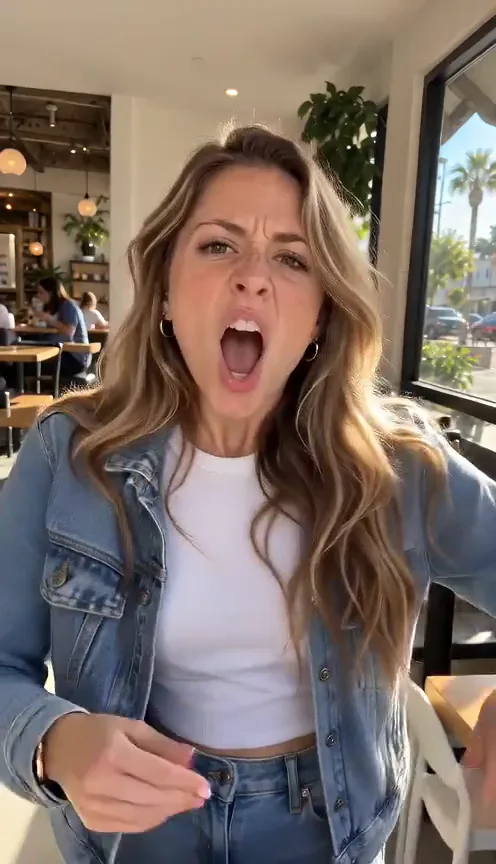 Badtime · AI-generated example
The Bad Times trend turns an argument into a performance. Set to Imael Angel’s “BAD TIMES,” creators count off their complaints, raise a hand for “wait,” point toward the camera and lean in with exaggerated expressions. The contrast between the dance track and the increasingly dramatic gestures gives the routine its humor.
“BAD TIMES” was released on March 30, 2026. A widely shared kitchen performance posted by @bouuhyachaka on September 9 became a recognizable example of the format. Creators adapted the routine with different performers, and AI remakes expanded it to cats, dogs and other unexpected characters. A familiar sequence of gestures becomes a different joke with each new subject.
Our Bad Times AI video generator brings that expressive routine to one photo. Keep the person’s original look with Badtime, animate an animal with Pet, or turn the person into a baby with Baby. All three use your photo’s setting. There is no performance to record or prompt to write. Start with a free 4-second preview, then create the complete video with AI-generated sound.
Make my Bad Times videoBring your photo to life with the familiar Bad Times gestures, keeping your face and original setting.
This 11-second demo was generated with Seedance 2.0 Mini from the photo below. Our template recreates the viral finger-counting routine with a new performer, keeping her café setting and denim outfit.
Choose a higher-tier model in the editor for finer details, more natural motion and stronger visual consistency.
She leans in and counts on her fingers, glancing between her hands and the camera.
An open palm comes up toward the lens with a dramatic sideways glance.
More counting and camera-facing gestures build the increasingly emphatic reaction.
Her hands lower as she eases back and looks directly at the camera.
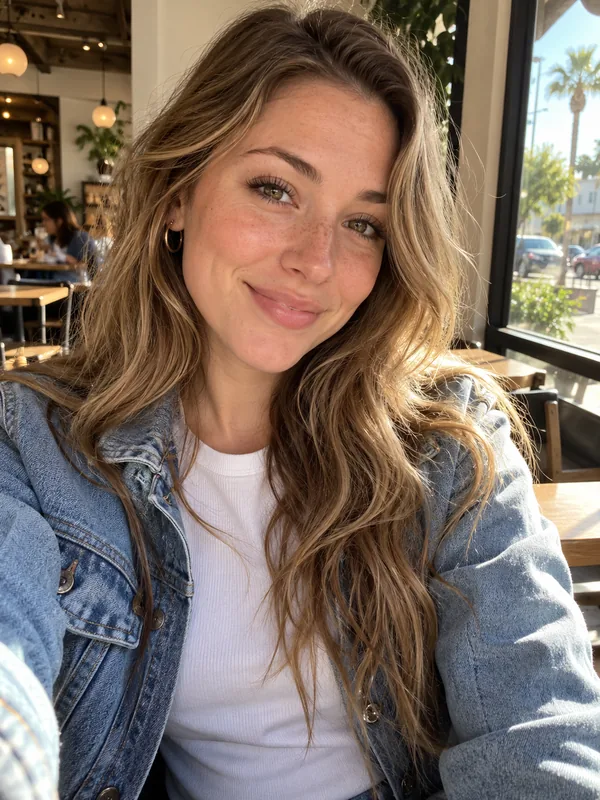
One café portrait supplies the performer, her outfit and the background in this demo.
Recreate it with my photoGive one photo a dramatic performance without rehearsing the routine yourself.
One clear image supplies your subject and setting. No recorded performance or collection of reference photos is needed.
Retain the subject’s appearance, clothing and background instead of moving them into the kitchen from the trend.
The gestures and sequence are already prepared. There is no choreography to learn or timeline to edit.
See the approach and finger-counting gestures before creating the complete routine. Free previews depend on account eligibility and availability.
Make an 11-second video covering the stop palm, emphatic pointing and retreat, with AI-generated sound.
Compare the four models and check the credit cost for your selected settings before submitting.
Try a free 4-second preview, subject to eligibility and availability. Full videos use credits, with the cost shown before generation.
480p · Standard · MP4
See the approach and finger-counting. The stop palm and retreat are in the full video.
Try free · 4 secondsChoose Standard, Fast, Pro or Ultra. These prices are for 720p; review the editor quote when changing resolution.
The free preview allowance is shared across the site’s video templates and is limited by account, network and daily availability. Credits reserved for a task are returned if it is confirmed as failed or canceled.
View all pricingUpload one clear photo: one person for Badtime or Baby, or one animal for Pet. A visible face, upper body and arms or front paws help accommodate the gestures. The photo also supplies the background.
The full video is 11 seconds. The free preview is 4 seconds and shows the opening approach and finger-counting. Choose 480p or 720p, in portrait (9:16), landscape (16:9) or square (1:1).
All versions are designed to retain your photo’s background. Badtime keeps the person’s appearance and clothing; Pet keeps fur, markings and existing accessories. Baby transforms the person into a baby and adapts their outfit to fit. Fine details can change during movement and occlusion.
No. The template supplies the movement and audio references. Upload one photo and choose your settings.
Eligible accounts can try one free 4-second preview at 480p with Standard, subject to availability. The allowance is shared across the site’s video templates, with account and network limits. Full videos require credits.
The preview shows the subject approaching the camera and counting off their points. The stop palm, emphatic pointing and retreat are in the full video; they are not compressed into the preview.
Standard uses Seedance 2.0 Mini, Fast uses Seedance 2.0 Fast, Pro uses Seedance 2.0, and Ultra uses Seedance 2.5.
At 720p, Standard costs 100 credits, Fast costs 240, Pro costs 400, and Ultra costs 595. Check the displayed quote when changing settings.
New generations include AI-generated sound guided by a prepared audio reference. The result may differ from the original recording; an identical copy of the song and exact lyric-to-mouth synchronization are not guaranteed.
“Bad Times” has been reported as AI-generated, including by French radio station Fréquence 3. The exact production process has not been confirmed by a direct artist or label statement in the sources reviewed. The AI reaction videos associated with the song are a separate use of AI.
If you mean the sound used in the dramatic argument videos featuring finger-counting, stop-palm gestures and AI animal remakes, it is “BAD TIMES” by Imael Angel. The single was released on March 30, 2026. Search for the artist and song title to find the correct track.
Yes. Upload a clear photo of one animal, then select Pet. The prompt adapts the counting and stop-palm routine to front-paw movements while keeping the animal’s species, markings, accessories and original background. Results can vary with pose and anatomy.
Badtime is the default and keeps the person in your photo. Pet is for an animal photo and uses paw gestures. Baby turns the person into a baby with recognizable features and their original outfit style. Choose after uploading; all three keep the photo’s background and use the same 11-second timing, models and pricing. The free preview also uses your selected version.
The template guides the gesture sequence and movement timing. Facial expressions, fingers, fine clothing details and the final performance can vary between generations.
Follow the task in My creations, then watch and download the completed result. Processing time depends on the selected model, queue and service availability. Check the existing task before submitting another generation.
Credits reserved for a task are returned when it is confirmed as failed or canceled. Failed free previews release their allowance. Queued or pending tasks are still being processed.
Use another person’s photo only with their permission. Ask for consent before uploading it and sharing the result. Do not present an AI remix as a real recording or endorsement.
Keep your look and setting, and let the template handle the drama. Try a free 4-second preview or create the full reaction.