
Examples
I’m So Sorry Trend Examples: A Five-Photo AI Reveal
Updated
One coffee cup costume, three corrections, and a five-photo reveal. Our I’m So Sorry trend example opens with a floral dress and a bouquet. Three apology captions take back the details before the original childhood costume photo delivers the surprise. Watch the 16-second video with music, then compare all five photos below.
Four AI-edited photos lead back to the supplied original. The video shows each for 3.2 seconds, with apology captions and music. Open any photo to compare the details without captions.
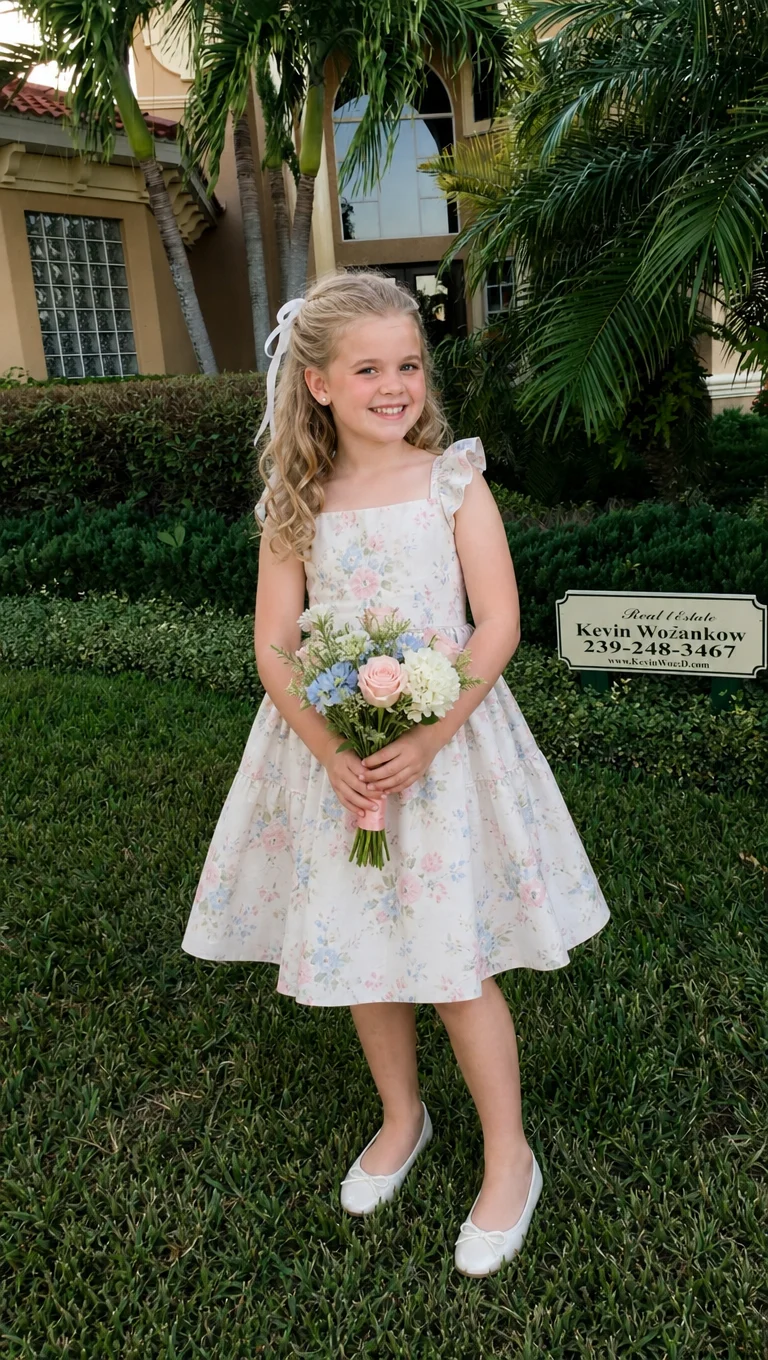
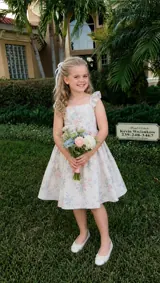 1. The polished opening“This was my outfit when I was little”
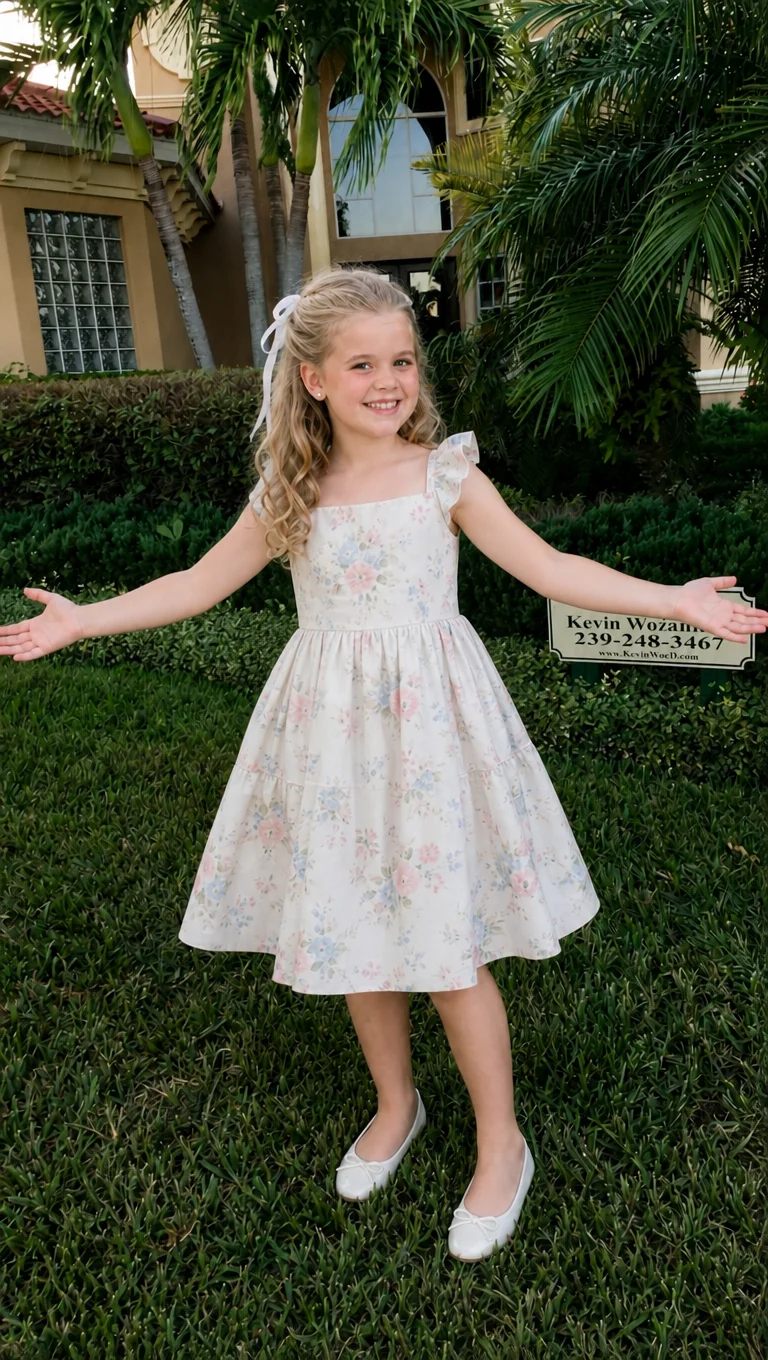
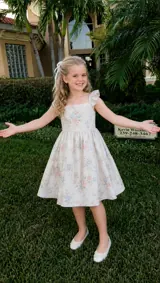 2. No flowers“Sorry I lied, I wasn't holding flowers”
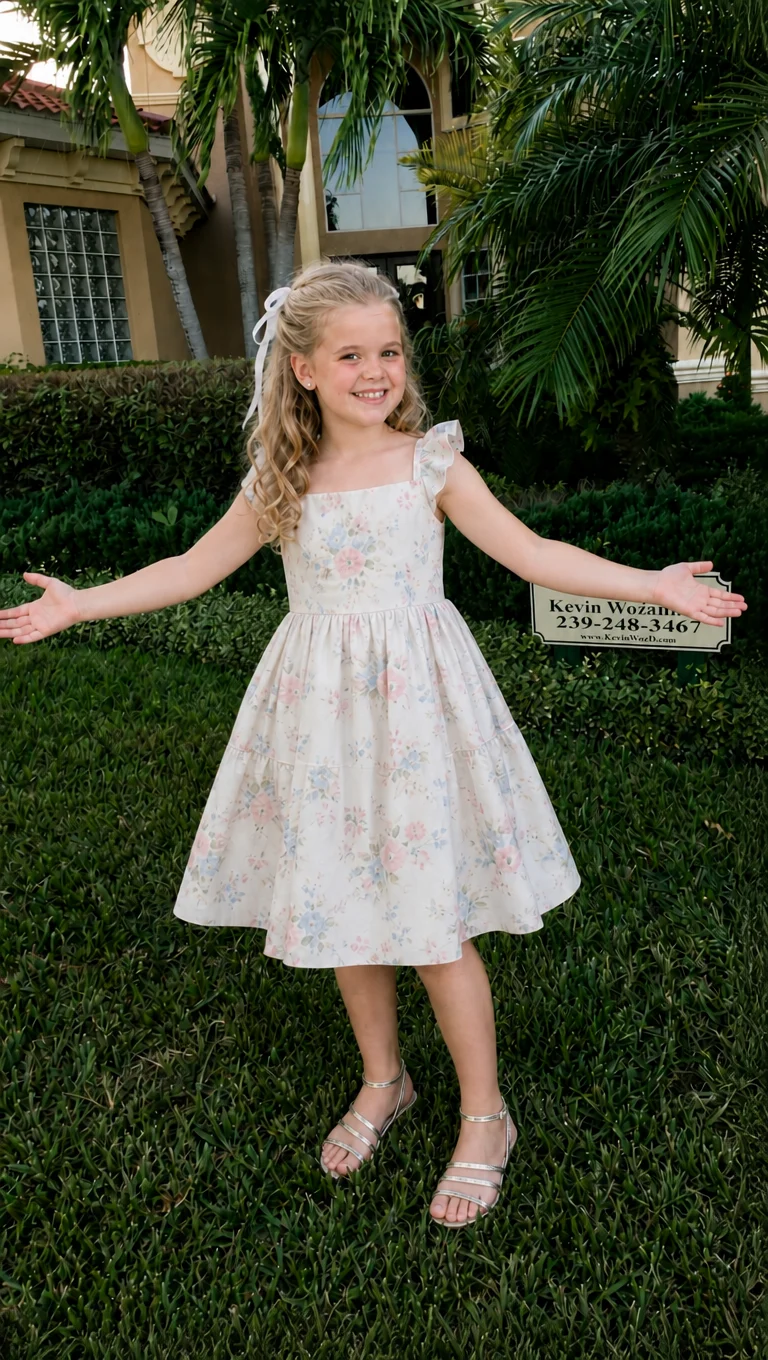
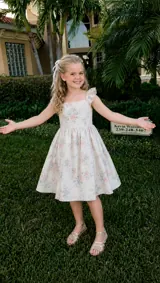 3. Silver sandals“Sorry I lied again, I wore silver sandals”
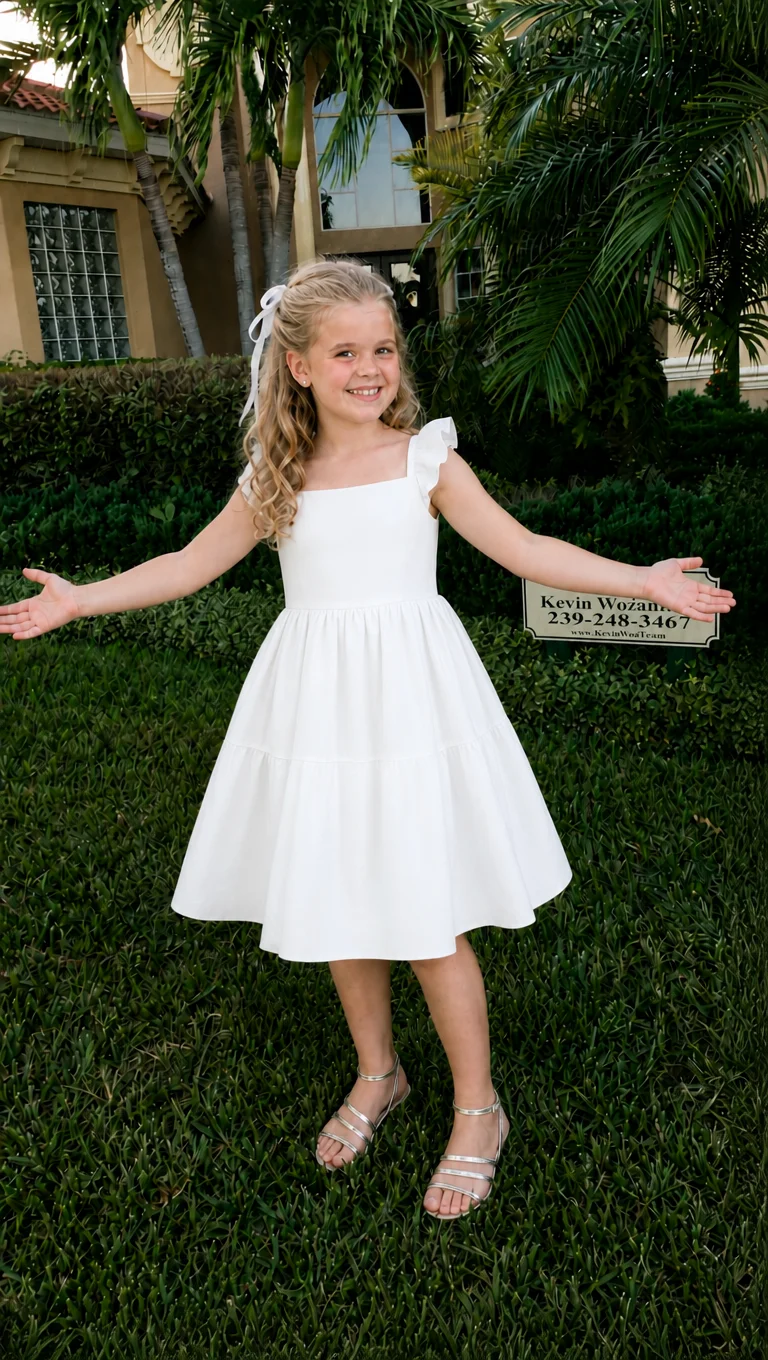
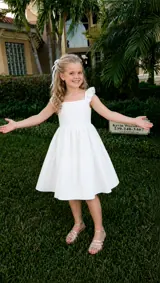 4. A white dress“And my dress was actually white”
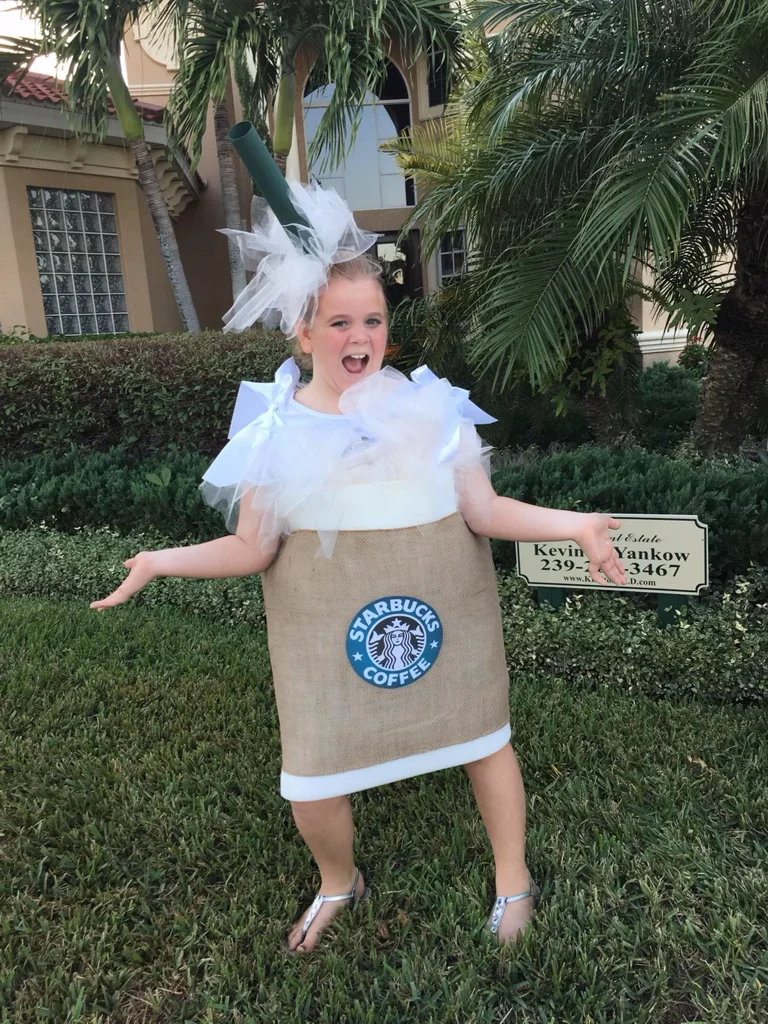
 5. The original reveal“I'm so sorry, I was a coffee cup”
What happens in the video, slide by slide
- 0:00–0:03.2 · The opening claim. The AI-edited photo shows a floral dress, a bouquet and white shoes. “This was my outfit when I was little” presents the polished picture as a real memory.
- 0:03.2–0:06.4 · The first correction. The flowers disappear and the arms extend outward. The floral dress and white shoes remain. “Sorry I lied, I wasn't holding flowers”.
- 0:06.4–0:09.6 · One more detail changes. Silver sandals replace the white shoes, while the hands remain empty. “Sorry I lied again, I wore silver sandals”.
- 0:09.6–0:12.8 · The last small admission. The floral dress becomes plain white. “And my dress was actually white” keeps the story going without giving away the costume.
- 0:12.8–0:16 · The photo behind the story. The original reveals a coffee cup costume with a straw headpiece and a playful expression. “I'm so sorry, I was a coffee cup” supplies the final confession.
The early slides keep the same garden setting and a recognizable subject. Each apology points to an easy-to-spot detail, while the coffee cup stays hidden until the ending. The original also changes the expression, pose and framing: the last reveal is bigger than any one correction.
Not every I’m So Sorry example needs five photos. Four-slide versions use the same claim-and-correction idea; our current generator uses a polished opening, three corrections and the original. For school, yearbook and other costume ideas, watch the other I’m So Sorry trend examples.
Photos that give the best result
- Start with the ending. Choose the real photo you want to reveal, then decide which details the earlier images will invent.
- Leave room for the story. A wider view of an outfit, pet or scene gives you more visible details to change than a tight crop.
- Keep the subject recognizable. Use one clear, well-lit person or pet photo with a visible face. Review the AI versions for unexpected changes before downloading.
- Choose a photo you can share. Check permissions and the platform’s current rules, especially for childhood photos.
How to make your own I’m So Sorry reveal
The I’m So Sorry AI generator creates the five-photo sequence from one upload, without a written prompt. It plans the visual corrections and matching captions for you, keeping your original for the ending.
- Upload the real reveal photo. Use JPG, PNG or WebP, up to 10 MB. Keep the outfit and the details that make the original surprising visible.
- Generate and review. The first image usually takes 30–60 seconds; the full story usually takes 2–3 minutes. Check each image and edit the apology captions to fit your joke.
- Preview and download. Export five captioned photos in a ZIP, or a 16-second vertical video with the example music. Video export uses MP4 where supported, with WebM as a fallback.
A full story costs 30 credits, including caption editing and downloads. One free polished-photo preview with reveal captions is available per verified account when the balance is below 30 credits. The middle photos require a full-story unlock; accounts with enough credits generate the full story directly. See credit packs and optional plans.
To follow along with your own photo, use our step-by-step I’m So Sorry tutorial.
For the format and editing steps, read What is the I’m So Sorry trend?
Questions
What changes between the photos in this example?
The opening shows a floral dress, a bouquet and white shoes. The next three photos remove the flowers, change the shoes to silver sandals, and turn the dress white. The final original photo reveals a coffee cup costume. Small shifts in the AI photos are visible too; the captions focus on the main correction in each step.
Are these photos extracted from the video?
No. These are the four AI-edited photos and the supplied original used in our current coffee costume example. They are shown without the video captions so you can compare the changes. The fifth photo is the original reveal, rather than another AI generation.
Do I need moving AI footage for this trend?
A sequence of still images is enough. This example holds each of its five pictures for 3.2 seconds, creating a 16-second video with captions and music. The generator also lets you download the five captioned photos as a ZIP for a carousel or your own edit.
Will my version look exactly like this one?
Your original photo, the AI edits and your captions shape the result. Keep the changes easy to follow and preview the full sequence before sharing. This example shows the storytelling format; your generated story will have its own corrections and reveal.
Can I edit the captions or try another version of a photo?
Yes. In your own story, caption edits are saved at no extra cost. After the full story is complete, regenerating one of the four AI photos costs 10 credits. Your original photo stays unchanged for the final reveal. The example on this page is read-only.