
I'm So Sorry AI generator
Join the I'm So Sorry trend on TikTok in 2026. Turn one photo of yourself, a friend or your pet into a funny reveal meme. Start with a polished version, then admit one change at a time until the real photo appears. Get five photos, editable apology captions and music for your video.
Example AI Video
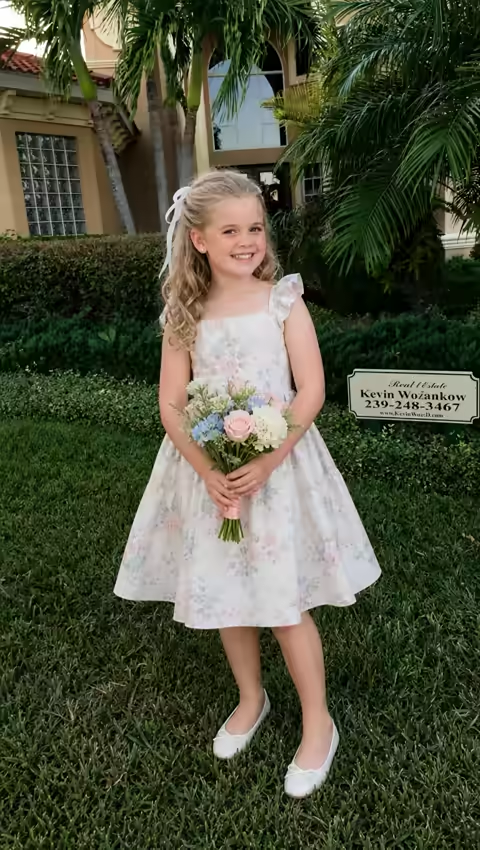
Watch how our AI Sorry I Lied Generator transforms a single photo into a five-step reveal video. Starting with an AI-generated glow-up, each scene reveals another truth before ending with the original photo of a girl in a coffee cup costume.
AI Transformation Steps
One detail changes in each stepSwipe to view all 5 photos →
How to join the I'm So Sorry trend in 2026: 3 steps
1. Upload your photo
Upload a clear, well-lit photo of one person or pet. Make sure the main subject is visible, including the outfit or details you want to reveal. This original photo appears last in your story.
2. Generate and edit your story
Review the 30-credit cost, then generate your five-photo story. The template creates an AI glow-up and three gradual corrections without a written prompt. Edit the caption beside each photo to match your joke.
3. Download and post
Preview your 16-second reveal with music, download the five captioned photos or the vertical video, and share it on TikTok or Instagram Reels. Your original photo delivers the final confession.
 A glow-up first. The real photo last.
What is the I'm So Sorry trend?
The I'm So Sorry trend turns an edited photo into a gradual confession. It opens with a polished portrait or an impressive costume, presented as the real thing. Each following slide removes one edit and admits the change in a short apology, until the original photo and a final “I'm so sorry I lied” reveal the joke.
The trend became popular again on TikTok in October 2026. People use it for Halloween costume reveals and a wide range of funny photo scenarios, bringing the same playful confession format to all kinds of images.
I'm So Sorry AI offers a quick way to join in. Upload one clear photo of yourself, a friend or your pet. The template creates the glow-up, three corrections and matching apology captions while keeping your original for the ending. Edit the words, preview the reveal with music, then download the photo set or a video.
Create your I'm So Sorry revealExplore another meme: Outstanding AI video generator · Bad Times AI video generator · Baby Wow Meme AI video generator · Ballon d’Or Filter video generator · Ozil Goal AI video generator · Drake AI video generator · Tip Toeing in My Jordans Meme Generator · NightWing AI video generator.
“I’m So Sorry I Lied” Examples and Clips People Keep Reposting
See our coffee costume reveal alongside five TikTok examples, from school photos to Halloween costumes. Each turns one edited picture into a string of confessions. Press play to watch with sound.
Make my versionSwipe to explore all 6 examples →
The coffee costume reveal
Our five-photo example starts with a floral dress and a bouquet. The flowers disappear, the shoes and dress change, and the original coffee cup costume delivers the final apology.
The first-day-of-school photo
A white polo, a backpack and a school skirt set up a polished school-day photo. The skirt turns into shorts before the original childhood snapshot delivers the final apology. Posted on TikTok by @meb1909.
The newborn photo
A smiling newborn with blonde hair opens the slideshow. The hair turns brown, the smile disappears, and the original hospital photo becomes the final reveal. Posted on TikTok by @eveliaava.
The sisters’ baby photo
A big sister kisses a smiling baby in a family snapshot. Each correction changes the baby’s hair or expression, until the last photo reveals she was asleep all along. Posted on TikTok by @siennasspot.
The ninth-grade yearbook photo
A yearbook portrait unravels one detail at a time: braces, lashes, a purple shirt and a missing purse. The original school photo lands the final “I’m so sorry” punchline. Posted on TikTok by @xxxtashianaxxx.
The Halloween costume switch
A blonde princess in a tiara introduces a Halloween memory. The hair and costume change with each confession, ending with a childhood witch costume and one last apology. Posted on TikTok by @boredpostin.
How much does an I'm So Sorry story cost?
Your first glow-up preview is free.
Generate your complete five-photo story and 16-second video for 30 credits.
One free preview per verified account when your balance is below 30 credits. Caption edits and downloads use no extra credits.
Free glow-up preview
See your polished photo and the captions before unlocking the middle photos. Sign in with a verified account to try it.
Full five-photo reveal
An AI glow-up, three gradual changes and your original photo. Includes caption editing, a photo ZIP and a video with music.
Regenerating one AI photo costs 10 credits. Your original photo stays unchanged.
View all pricingI'm So Sorry AI questions
Can I edit captions or regenerate a photo?+
Yes. Edit the caption beside any photo; changes are saved to your account at no extra cost. Once the full story is complete, regenerating one AI photo costs 10 credits, shown on its button. Your original photo is kept unchanged for the final reveal.
Can I download the photos and a video with music?+
Yes. Download all five captioned photos together in a ZIP, or export a 16-second vertical video with the example music. Photos are 720 × 1280 JPEGs. Video downloads use MP4 where supported, with WebM as a fallback. Downloads use no additional credits.
What photos work best?+
Choose a clear, well-lit photo with one main subject and a clearly visible, unobstructed face. Goofy, funny or awkward photos work especially well: a silly expression, an unusual outfit or an old costume makes the final reveal more surprising and fun. Keep the outfit and other details visible so the AI has more to play with. Upload JPG, PNG or WebP, up to 10 MB, with dimensions from 300 to 6000 pixels per side.
Can I make an I'm So Sorry AI video of my friends?+
Yes, with their permission. Upload a clear photo of one friend to make them the main character of the reveal. Ask for their consent before uploading their photo and sharing the generated photos or video.
Can I make an I'm So Sorry AI video with my dog or cat?+
Yes. Choose a clear, well-lit photo with one pet and a visible face. The AI adapts the changes to the subject while keeping your original photo for the final reveal. Results can vary with the photo.
Can I use a celebrity’s photo?+
Only use a photo if you have explicit permission to use both the image and the person’s likeness for this purpose. A celebrity photo being available online does not provide that permission. Do not use generated photos or videos to impersonate someone or suggest their endorsement.
How long does generation take?+
Your first image usually takes about 30–60 seconds, and the full story takes about 2–3 minutes. AI analyzes your uploaded photo to automatically come up with funny reveal ideas and matching captions, then generates the images in sequence. The workspace shows the current stage as your story comes together.
What happens if a generation fails?+
If a paid generation is confirmed as failed, the credits reserved for that attempt are returned. A queued or pending story is still processing. Refreshing restores the same story without charging again. Your one-time free preview allowance is not renewed after a failed attempt.
Is I'm So Sorry AI free?+
You can try one free glow-up preview per verified account when your balance is below 30 credits. It includes the polished photo and reveal captions. After the preview finishes, the Generate button becomes Unlock full story. A complete five-photo story costs 30 credits; accounts with enough credits generate the full story directly.
Do I need a subscription?+
No. Buy a one-time credit pack whenever you need more stories. Each complete five-photo story costs 30 credits. Optional monthly or annual plans are also available.
Do credits expire or renew automatically?+
One-time packs never expire or renew automatically. Subscriptions renew until canceled in Billing. Monthly allowances refresh each billing month; annual allowances are granted up front. Unused plan balances expire at the end of the billing period without rollover.
Your I'm So Sorry reveal starts with one photo.
Upload the original, create your five-photo story, and let the captions reveal the truth.