
1. Upload your photo
Use a clear, well-lit photo of one person with their face fully visible. A waist-up or full-body shot helps show the outfit.
Upload a photo, choose your cosplay outfit, and let NightWing AI turn it into a transformation video with the original Nightwing choreography.
Use a clear, well-lit photo of one person with their face fully visible. A waist-up or full-body shot helps show the outfit.
Choose Nightwing, Hatsune Miku or a maid outfit. Your video will follow the original Nightwing clip’s transformation timing, choreography and camera movements.
Choose Basic (480p) or HD (720p), then your format. Try a free 2-second preview, or create a full 12-second video and download it from My creations.
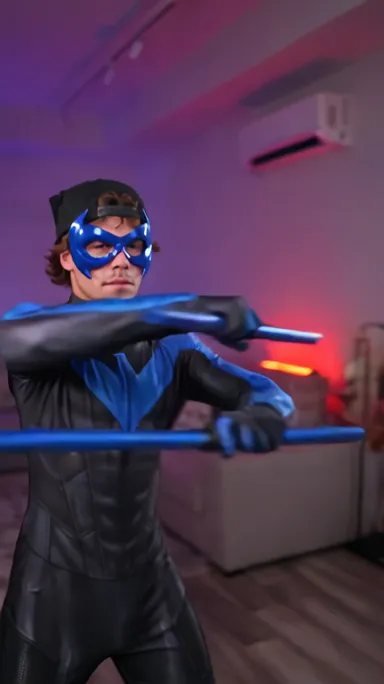
The Nightwing Cosplay trend turns a costume reveal into a dance: someone in everyday clothes lifts a mask to their face, the scene transitions, and they reappear in a black-and-blue Nightwing suit. In a purple-lit room, they follow the beat with turns, arm movements and confident poses. The mask, outfit switch and choreography make the Nightwing trend instantly recognizable.
The trend took off with Beth Cast’s original TikTok video, then spread across social media as people recreated the reveal and dance in their own outfits. What began with a Nightwing suit became a cosplay format of its own, with creators trying different costumes while keeping the same transformation and choreography.
NightWing AI gives you a fast way to join the Nightwing trend. Upload one clear photo, choose Nightwing, Hatsune Miku or a maid outfit, and let the template create the transformation and dance with you as the main character. There is no costume to buy, performance to film or sequence to edit. Try a free 2-second preview, or create and download your full 12-second video.
Make my NightWing AI videoWatch our AI-generated demo alongside Beth Cast’s original costume reveal and Nightwing, Hatsune Miku and maid outfit versions from TikTok. The same transformation and dance take on a different look in each clip. Press play to watch with sound.
Make my NightWing AI videoSwipe to explore all 5 examples →
This Nightwing video was generated with AI using the original photo.
The mask, black-and-blue suit and purple-lit dance that inspired the remakes.
A Nightwing version follows the outfit reveal and matching dance in a purple-lit room.
Turquoise twin tails and a Hatsune Miku outfit bring a different character to the same choreography.
A black-and-white maid outfit, frilled headband and apron put a playful spin on the same transformation and dance.
NightWing AI turns one photo into a cosplay transformation and dance video using a prepared Nightwing motion reference. Choose your outfit without filming a performance or editing a video.
Upload one clear photo of yourself. NightWing AI uses your photo to guide the main character’s appearance in the transformation and dance video.
Choose a Nightwing suit, Hatsune Miku outfit, or black-and-white maid outfit. All three options use the Nightwing transformation and dance reference.
The template includes the transformation sequence, motion reference, and camera direction. You do not need to write a prompt, record a dance, or edit a timeline.
Eligible new accounts can generate one free 2-second preview at 480p, subject to availability. The free trial is shared across the site’s video templates.
Generate a 12-second MP4 in portrait (9:16), landscape (16:9), or square (1:1). Choose Basic at 480p or HD at 720p.
A full video costs 100 credits for Basic or 200 credits for HD. One-time credit packs are available without a subscription. Reserved credits are returned when a task is confirmed as failed or canceled.
New accounts can try one free 2-second preview in 480p with Basic, subject to availability. This trial is shared across the site’s video templates. The preview shows the opening mask movement at original speed; the outfit change is in the full video.
480p · Basic · MP4
Try free · 2 s previewSee yourself in your chosen outfit, performing the original choreography. Basic (480p) costs 100 credits; HD (720p) costs 200 credits.
You’ll need credits to generate a full video. Credits from one-time packs never expire. If a task is confirmed as failed or canceled, its reserved credits are returned.
View all pricingEach full video is fixed at 12 seconds and uses Wan 3.0. The free preview is 2 seconds at 480p. Full videos cost 100 credits for Basic (480p) or 200 credits for HD (720p). Choose portrait (9:16), landscape (16:9) or square (1:1) to suit where you plan to post it.
No. The template supplies the original Nightwing transformation and dance reference, so you do not need to film a performance or write a prompt. Upload one photo, pick your outfit, and choose your quality and format. Generated audio may differ from the original song.
Use a clear, well-lit photo of one person with their face fully visible. A waist-up or full-body shot helps show the outfit. Avoid blurry photos, heavy shadows and anything covering the face. Upload a JPG, PNG or WebP file up to 10 MB, with each side between 300 and 6000 pixels.
Yes, with their permission. Upload a clear photo of one friend to make them the main character. Ask for their consent before uploading their photo and sharing the generated video.
Nightwing, Hatsune Miku and a black-and-white maid outfit. All three outfits follow the original Nightwing choreography.
Only use a photo if you have explicit permission to use both the image and the person’s likeness for this purpose. A celebrity photo being available online does not provide that permission. Do not use generated videos to impersonate someone or suggest their endorsement.
Generation takes about 3 minutes on average. Processing time varies with the generation queue and service availability. You can check the task status in My creations and return later; you do not need to keep this page open while the video is being generated.
If a task is confirmed as failed or canceled, the credits reserved for it are returned. Queued or pending tasks are still being processed. Check the status in My creations. If your submission is still being verified, keep the task ID and retry the same request to avoid paying for a duplicate.
Yes, the preview is free. A new account gets one 2-second preview with no card needed, subject to availability.
No. Buy a one-time pack whenever you need more NightWing AI videos. Optional monthly or annual plans are also available.
Credits from one-time packs never expire, and buying a pack does not start a subscription. Subscriptions renew automatically until you cancel in Billing. Monthly plan credits are issued each billing month; annual plan credits are issued up front. Unused subscription credits expire at the end of the billing period and do not roll over.
Choose your outfit and turn your photo into a Nightwing transformation video.