
1. Upload your photo
Use a clear, well-lit photo of one person with their face fully visible. A waist-up or full-body photo helps show their appearance and proportions.
Create your own Baby Wow (Bby Wow) dance meme from one photo. Our AI video filter recreates the party dance, playful bite, and camera turn. No editing or prompts needed. Try a free 4-second preview.
Use a clear, well-lit photo of one person with their face fully visible. A waist-up or full-body photo helps show their appearance and proportions.
Keep the outfit from your photo in a prepared party scene and dance sequence. Choose Standard, Fast, Pro, or Ultra, then select your resolution and format. Review the credit cost before generating.
Try a free 4-second preview to see the approach and snack moment. Generate the full video for the complete sequence, including the turn back toward the party. Follow your task in My creations and download the finished result.
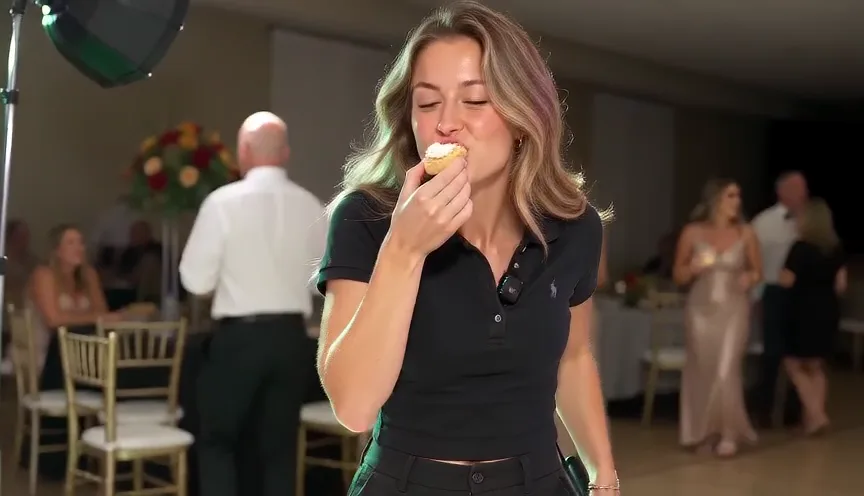 AI-generated example
The Baby Wow dance meme, also known as the Bby Wow dance, is associated with “BbY WOW” by KAROL G, Judeline, and rusowsky. The main character dances toward the camera, takes a bite without stopping, and turns back toward the crowd. The relaxed expression and playful snack break give the performance its humor.
A TikTok example shared by @viralsmundi3 shows the sequence on an indoor party dance floor, surrounded by formally dressed guests and moving colored lights. The approach, bite, camera glance, and turn form a continuous scene. A personal version puts a different person at the center while keeping those visual beats.
Here, “AI filter” means a preset AI video effect you use in your browser, rather than a live TikTok camera filter. The ready-made template supplies the scene and movement sequence from one photo, so there is no dance to record or timeline to edit. Start with a free 4-second preview, then create the complete video with AI-generated sound.
Make my Baby Wow videoStep into the Baby Wow party scene with your own face and the dance moves that make the video so recognizable.
This 9-second demo was generated with Seedance 2.0 Mini from the photo below. Our template puts her into the viral Baby Wow party scene, recreating the dancing approach, playful bite and turn back to the crowd.
Choose a higher-tier model in the editor for finer details, more natural motion and stronger visual consistency.
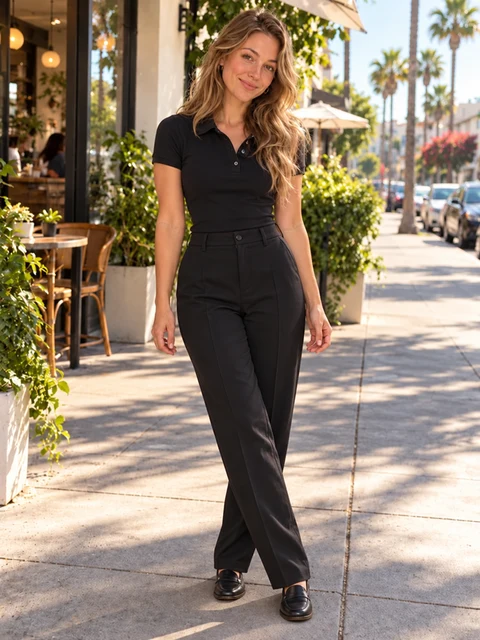
This outdoor portrait supplies the lead dancer’s face, hair and black outfit. The template brings her into the party.
Recreate it with my photoShe approaches with loose shoulders, bouncing knees and small crossing steps.
She raises the snack to her mouth while keeping the microphone in her other hand.
She chews and looks toward the lens as the party lights change around her.
She turns away and continues dancing toward the guests, completing the familiar routine.
Bring your photo into the party scene without learning the steps or recording a performance.
Upload one clear portrait to guide the main character’s appearance throughout the dance.
Create your own version, or use a friend’s photo with their permission. Other guests remain separate background characters.
The scene, movement sequence, and camera direction are already prepared, while your photo supplies the outfit. No prompt writing or dance recording is required.
See the opening approach and bite before creating the full sequence. Free previews are subject to account eligibility and availability.
Create an approximately 9-second video that continues through the camera glance and turn back toward the crowd, with AI-generated sound.
Compare the available models and check the credit cost for your selected settings before submitting.
Try a free 4-second preview, subject to eligibility and availability. Full videos use credits, with the cost shown before generation.
480p · Standard · MP4
See the opening dance and bite at the original pace. The turn is in the full video.
Try free · 4 secondsChoose Standard, Fast, Pro, or Ultra. The prices below are for 720p; review the editor quote when changing resolution.
The free preview allowance is shared across the site’s video templates and is limited by account, network, and daily availability. Credits reserved for a task are returned if it is confirmed as failed or canceled.
View all pricingUpload one clear photo of one person. The photo guides the main character’s appearance; the template supplies the party scene and movement sequence.
The full video is approximately 9 seconds. The free preview is 4 seconds and shows the opening approach and snack moment. Choose 480p or 720p, in portrait (9:16), landscape (16:9), or square (1:1).
It shows the character approaching the camera and taking a bite at the original pace. Generate the full video to include the turn back toward the party.
Eligible accounts can try one free 4-second preview at 480p with Standard, subject to availability. The allowance is shared across the site’s video templates and account and network limits apply. Full videos require credits.
Choose Standard with Seedance 2.0 Mini, Fast with Seedance 2.0 Fast, Pro with Seedance 2.0, or Ultra with Seedance 2.5.
At 720p, Standard costs 100 credits, Fast costs 240, Pro costs 400, and Ultra costs 595. Review the displayed quote when changing settings.
Yes. New generations include AI-generated sound guided by a prepared audio reference. The result may differ from the original recording.
No. The template provides the movement and audio references. You only need to upload your photo and choose your settings.
No. This template recreates the party dance sequence. It does not apply a baby-face or age-transformation effect.
The template keeps the outfit visible in your photo and uses a fixed indoor party setting. Upload a photo showing the clothes you want to keep; the photo’s background is not used.
Your photo is used for the main character. The other guests remain separate background characters.
The template guides the movement and scene, but AI-generated results can vary. Facial expressions, hand movements, food details, lighting, and background guests may differ between generations.
Processing time depends on the selected model, queue, and service availability. Follow the task in My creations; you can return later to check its progress.
If a task is confirmed as failed or canceled, its reserved credits are returned. Failed free previews release their allowance. Check an existing task before submitting another generation.
Use another person’s photo only with their permission. Ask for their consent before uploading the photo and sharing the generated video. Do not present an AI remix as a real recording or endorsement.
Upload one clear photo, choose your video settings, and generate your Baby Wow Meme video. The AI template automatically recreates the party dance, snack bite, and camera movement. No original footage or editing skills are required.
On this page, Baby Wow and Bby Wow refer to the same party-dance meme associated with “BbY WOW” by KAROL G, Judeline, and rusowsky. This template recreates the dance sequence rather than applying a baby-face effect.
Yes. Upload one clear photo of yourself, or someone who has given you permission, and the AI template puts that person in the party-dance scene. Try a free 4-second preview or use credits for the full video of about 9 seconds. New generations include AI-generated sound guided by an audio reference; the original song recording is not guaranteed.
Step into the party scene, take a bite, and keep the dance going. Try a free 4-second preview or create the full video.