
1. Upload your photo
Upload a clear, well-lit photo of one person, pet or illustrated character. Make sure the main subject’s face is clearly visible.
Use the Drake AI video generator to turn one photo into a dance meme. Step into a Drake-inspired house party, silver cup in hand, with you, a friend or your pet as the star. The template supplies the party scene and dance reference.
Upload a clear, well-lit photo of one person, pet or illustrated character. Make sure the main subject’s face is clearly visible.
Choose Standard, Fast, Pro or Ultra, a supported resolution and 9:16, 16:9 or 1:1. The Drake dance template supplies the party setting and movement without a written prompt. Review the cost, then generate your video.
Preview your 15-second Drake dance meme, download it without an added watermark, and share it on TikTok or Instagram Reels. Find the finished clip again in My creations.
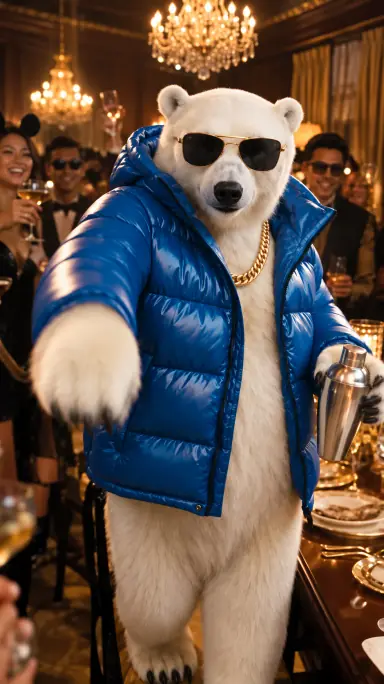 Everyone’s on the guest list.
The Drake AI video trend recreates the party sequence from “Burning Bridges”: a chandelier-lit room, a crowd of guests and a lead performer holding a silver cup. The camera follows closely as the performer sways, sings along and gestures toward the guests, capturing the energy of a handheld party video.
The original “Burning Bridges” music video was published on Drake’s official YouTube channel on May 15, 2026. AI recreations were circulating on X by late September 2026 and gaining traction on TikTok in early October, as people began recreating the scene with themselves, partners and friends in the starring role.
Drake AI video offers a quick way to join in. Instead of filming a performance or editing a sequence, upload one clear photo. The template recreates the party setting, silver cup, dance movements and camera rhythm, with your chosen person or pet as the main character.
Create your Drake AI videoExplore another meme: Outstanding AI video generator · Bad Times AI video generator · Baby Wow Meme AI video generator · Ballon d’Or Filter video generator · Ozil Goal AI video generator · Tip Toeing in My Jordans Meme Generator · NightWing AI video generator · I'm So Sorry AI video generator.
Your first 4-second preview is free.
Choose Standard 480p or 720p for your full 15-second video.
A better model, higher resolution or longer video costs more. Pack credits never expire; plans refresh every month for less per video.
See your character in the scene before creating the full video.
Your character in the full house-party dance, silver cup in hand.
Lowest per-video prices with Ultra yearly · $600 billed yearly for 60,000 credits.
View all pricingEach full video is fixed at 15 seconds. The free preview is 4 seconds at 480P with Standard (Seedance 2.0 Mini). For full videos, choose Standard, Fast, Pro or Ultra, with 480P/720P on all models and 1080P on Pro and Ultra. Choose portrait (9:16), landscape (16:9) or square (1:1) to suit where you plan to post it.
No. The Drake dance template supplies the house-party setting, silver cup and dance reference, so you do not need to film a performance or write a prompt. Upload one photo and choose your quality and format. Generated audio may differ from the original song.
Use a clear, well-lit photo with one main subject and a clearly visible, unobstructed face. Avoid blurry images, heavy shadows and objects covering the face. Upload JPG, PNG or WebP, up to 10 MB, with dimensions from 300 to 6000 pixels per side.
Yes, with their permission. Upload a clear photo of one friend to make them the main character. Ask for their consent before uploading their photo and sharing the generated video.
Yes. You can use a photo of your dog, cat or another pet as the main character. Choose a clear, well-lit photo with one pet and a clearly visible face. The dance and appearance can vary with the photo.
Only use a photo if you have explicit permission to use both the image and the person’s likeness for this purpose. A celebrity photo being available online does not provide that permission. Do not use generated videos to impersonate someone or suggest their endorsement.
Generation takes about 3 minutes on average. Processing time varies with the generation queue and service availability. You can check the task status in My creations and return later; you do not need to keep this page open while the video is being generated.
If a task is confirmed as failed or canceled, the credits reserved for that attempt are returned. A queued or pending task is still processing. Check its status in My creations; if a submission is still being checked, keep the task ID and retry that same request to avoid submitting another paid job.
Yes, the preview is free. A new account gets one 4-second preview with no card needed.
No. Buy a one-time pack whenever you need more Drake AI videos. Optional monthly or annual plans are also available.
One-time packs never expire or renew automatically. Subscriptions renew until canceled in Billing. Monthly allowances refresh each billing month; annual allowances are granted up front. Unused plan balances expire at the end of the billing period without rollover.
Upload your photo, choose your settings, and create a 15-second dance video.