
1. Upload your two photos
Add one clear photo to the Dancer slot and another to the Partner slot, in either order. Each labeled slot sets a character in the Tip Toe dance. Keep both faces visible and use a separate image for each role.
Make your own Tip Toeing in My Jordans meme from two photos. Inspired by the AI Rumpelstiltskin meme, this template puts your chosen characters in the dancer and reacting partner roles. Create a 12-second barn dance video, or start with a free 4-second preview.
Add one clear photo to the Dancer slot and another to the Partner slot, in either order. Each labeled slot sets a character in the Tip Toe dance. Keep both faces visible and use a separate image for each role.
Choose Standard, Fast, Pro or Ultra, a supported resolution and 9:16, 16:9 or 1:1. The Tip Toeing in My Jordans template supplies the dance and reaction shots without a written prompt. Review the cost, then generate.
Preview your 12-second Tip Toe dance meme, download it without an added watermark, and share it on TikTok or Instagram Reels. Find the finished clip again in My creations.
 Two characters. One recognizable dance.
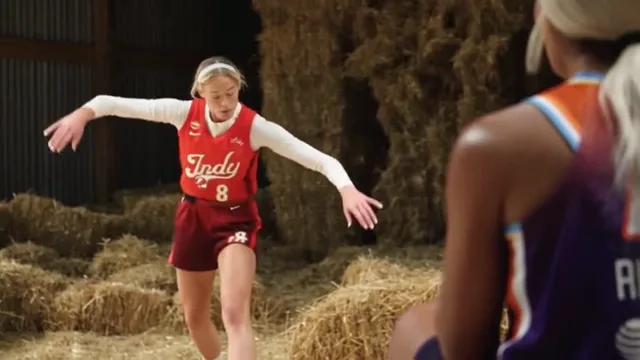
The Tip Toe meme pairs a confident dancer with a surprised onlooker in a warmly lit barn. Also known as the “tiptoeing in my Jordans meme,” it combines an AI-generated Rumpelstiltskin dance with RiFF RAFF’s “Tip Toe Wing In My Jawwdinz.” A shushing gesture, reaction close-ups and playful footwork make the scene recognizable.
The original AI scene was shared on Instagram in late August 2026. Edits pairing it with the song spread on TikTok in late September. The Rumpelstiltskin meme looks like an older fantasy film, but the dance is AI-generated. People began recreating it with themselves, friends and pets as the two characters. Read the trend’s origin and timeline
Create your own version from two photos instead of filming the dance and reaction or assembling the shots yourself. The template guides a 12-second sequence with the barn setting, shushing gesture, reaction close-ups and footwork, adapted to your chosen characters.
Create your Tip Toe in My Jordans videoExplore another meme: Outstanding AI video generator · Bad Times AI video generator · Baby Wow Meme AI video generator · Ballon d’Or Filter video generator · Ozil Goal AI video generator · Drake AI video generator · NightWing AI video generator · I'm So Sorry AI video generator.
Your first 4-second preview is free.
Choose Standard 480p or 720p for your full 12-second video.
A better model, higher resolution or longer video costs more. Pack credits never expire; plans refresh every month for less per video.
See your character in the scene before creating the full video.
Your two characters in the full barn scene, from the reactions to the footwork.
Lowest per-video prices with Ultra yearly · $600 billed yearly for 60,000 credits.
View all pricingIt is an AI-generated scene of Rumpelstiltskin dancing for a woman in a straw-filled barn, commonly paired with RiFF RAFF’s “Tip Toe Wing In My Jawwdinz.” The shushing gesture, tiny steps and reaction shots became a format for funny captions and character remixes.
Yes. The viral barn dance was made with AI to resemble an older fantasy film. It is not a scene from the 1987 Rumpelstiltskin movie. Our template creates a new version with the two characters you choose.
The circulating edits use RiFF RAFF’s “Tip Toe Wing In My Jawwdinz.” The song predates the AI dance, and its hook is often written as “tip toeing in my Jordans.”
Upload one clear photo to the Dancer slot and a separate photo to the Partner slot, in either order. Choose your model, resolution and format, then generate your 12-second dance meme. New accounts can start with one free 4-second preview.
Each full video is 12 seconds long with any of the four Seedance models. The free preview is 4 seconds at 480P with Standard (Seedance 2.0 Mini). Full-video resolution starts at 480P, with 720P on all models and 1080P on Pro and Ultra. Choose portrait (9:16), landscape (16:9) or square (1:1) for your preferred platform.
No. The Tip Toe in My Jordans template supplies the barn setting, dance, reaction shots and audio reference. Add a photo to each character slot and choose your settings. Generated movement and audio can vary from the example.
Use clear, well-lit photos with one main subject and an unobstructed face. Upload two separate photos into the dancer and reacting partner slots, in either order. JPG, PNG and WebP are supported, up to 10 MB each, with dimensions from 300 to 6000 pixels per side.
Yes, with their permission. Use one friend as the dancer and another as the reacting partner, or put yourself in either role. Get consent before uploading their photos and sharing the result.
Yes. Use a clear photo with one pet and a visible face. Your pet can take either the dancer or partner role. Movement and appearance can vary with the photo.
Only use a photo if you have explicit permission to use both the image and the person’s likeness for this purpose. An image being available online does not provide that permission. Do not impersonate someone or suggest their endorsement.
Generation takes about 3 minutes on average. Processing time varies with the queue and service availability. Check the task in My creations and return later; you do not need to keep this page open during generation.
Credits are returned when a video is confirmed as failed or canceled, and failed free previews release their allowance. Progress updates automatically in the workspace and My creations. You can change your photos and generate another video while an earlier one is processing. Each new full video uses the credits shown before generation.
Yes, the preview is free. A new account gets one 4-second preview with no card needed.
No. Buy a one-time pack whenever you need more videos. Optional monthly or annual plans are also available.
One-time packs never expire or renew automatically. Subscriptions renew until canceled in Billing. Monthly allowances refresh each billing month; annual allowances are granted up front. Unused plan balances expire at the end of the billing period without rollover.
Choose your dancer and partner, set your quality and format, and create a 12-second video.